 | Logo by Nickman (anonymous IP: 216.73.216.26,2511) | |||||||||||||
| ||||||||||||||
 Audio (351) Datatype (51) Demo (211) Development (628) Document (24) Driver (102) Emulation (155) Game (1055) Graphics (516) Library (123) Network (242) Office (69) Utility (961) Video (74) Audio (351) Datatype (51) Demo (211) Development (628) Document (24) Driver (102) Emulation (155) Game (1055) Graphics (516) Library (123) Network (242) Office (69) Utility (961) Video (74) Total files: 4562 Full index file Recent index file
Amigans.net Aminet IntuitionBase Hyperion Entertainment A-Eon Amiga Future
Support the site
|
      Short: AmiBookReader - eBook & document reader for AmigaOS 4.1
Uploader: Falke_34
Author: Falke_34
Type: office
Version: 1.5
Requires: AmigaOS 4.1
Architecture: ppc-amigaos >= 4.1.0
Distribution: Aminet / OS4Depot
Replaces: -
================================================================
AmiBookReader v1.5
An eBook and document reader for AmigaOS 4.1
================================================================
Description
-----------
AmiBookReader is a native PowerPC AmigaOS 4.1 application for reading
e-books, comics and documents. It uses MuPDF as its rendering engine
together with a classic ReAction GUI, so it feels right at home on
Workbench.
Supported formats:
* epub, pdf, cbz, xps, oxps, fb2, mobi - documents / e-books
* md, markdown - Markdown documents
* html, htm, xhtml - (X)HTML documents
* guide - AmigaGuide documents
* png, jpg, jpeg, gif, bmp, tiff, tif - standard images
* svg, txt, readme - vector graphics / text
* jp2, jpx - JPEG 2000
* jbig2 - often embedded in scanned
PDFs, can also be opened
directly
* pnm, pbm, pgm, ppm, pam - Unix bitmap formats
Features
--------
- Native ReAction GUI, resizable window
- Contents/bookmarks panel showing the document outline (when
available); the "Contents" menu item is greyed out if the
document has no outline
- Search panel: find text, jump to previous/next match, page
position is remembered
- Export menu: export the current page or the whole book as PDF,
PNG, JPEG, HTML, XHTML or plain text
- Zoom panel with +/- buttons and reset, or +/- keyboard shortcuts
when the panel is closed
- Ctrl + mouse wheel zooms in/out
- Mouse wheel scrolling (scrolls within page, turns page at edge)
- Vertical and horizontal scrollbars
- Fullscreen mode (View menu, checkbox)
- Night mode and Sepia reading mode (experimental)
- Bookmarking: automatically remembers the last opened book and page
- "Start with Last Document" option (Settings menu)
- "Keep Window Size on Exit" option (Settings menu) - now also
saves and restores the main window's position, not just its size
- Contents panel and Zoom panel position/size are saved and
restored reliably
- Jump to first/last page (<< / >> buttons), direct page selection
- Drag & Drop: drop a file onto AmiBookReader to open it directly;
files dropped onto the iconified AppIcon now open right away,
no need to uniconify first
- Iconify support
- Shell support with command line arguments (see below)
- Workbench icon and screen title integration
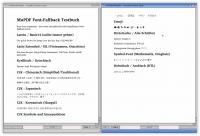
- Full Unicode font fallback (CJK, Vietnamese and other Latin
Extended scripts, emoji, historical scripts, math/symbol
characters) for documents without embedded fonts
- Icons created by McFly
Requirements
------------
- AmigaOS 4.1 Final Edition
- A PowerPC AmigaOne / Sam440 / other AmigaOS 4 compatible system
- A reasonable amount of Fast RAM is recommended for larger PDFs
or high-resolution scans
Installation
------------
1. Copy the AmiBookReader drawer to your hard disk (e.g. Work:).
2. Double-click the AmiBookReader icon to launch.
3. Optionally drag a supported file onto the icon/window to open
it directly.
Usage from Shell
-----------------
AmiBookReader [FILE] [PAGE <n>] [PUBSCREEN <name>]
FILE - path to a document, e-book or image to open
PAGE - page number to jump to (1 = first page)
PUBSCREEN - name of a public screen to open the window on
Examples:
AmiBookReader Work:Books/manual.pdf
AmiBookReader Work:Books/manual.pdf PAGE 42
AmiBookReader Work:Books/manual.pdf PUBSCREEN MyScreen
Without any arguments, AmiBookReader resumes the last opened book
and page automatically, unless "Start with Last Document" has been
disabled in the Settings menu.
Known Issues
------------
- Night mode and Sepia are experimental and may still need some
fine-tuning on certain images or colour profiles.
- Stray €→¤ substitution when opening files typed in AmigaOS
NotePad using the AmigaOS keymap: this is caused by the AmigaOS
keymap storing € as the CP1252 byte 0x80 rather than its proper
Latin-1 or UTF-8 form, outside the scope of AmiBookReader to fix.
Credits
-------
- Rendering engine: MuPDF (https://mupdf.com)
- GUI: ReAction / AmigaOS 4.1 classes (window.class, layout.class,
button.class, space.class, scroller.class, menuclass)
Contact
-------
Author: Falke_34
Email: falke.34()gmx.de
================================================================
History / Changelog
================================================================
v1.5 (30.08.26)
New:
- AmigaGuide (.guide) support: AmigaGuide documents are parsed
natively (amiguide_parser), converted to HTML internally and
passed to MuPDF for display. Internal navigation links
((){"label" LINK NodeName}), bold/italic/underline formatting
and the document title from the ()database header are all
supported. The ASL file requester now lists .guide files, and
the welcome page lists AmigaGuide as a supported format.
- .readme files can now be opened directly (listed in the ASL
file requester filter, treated as plain text).
Updated:
- MuPDF updated to 1.28.2 (fixes a UTF-8 text rendering bug
present in 1.28.0 and 1.28.1 that was the root cause of the
mojibake seen in earlier v1.4 builds).
Fixed:
- Properties dialog: document metadata (title, author, etc.) is
now converted from UTF-8 to Latin-1 before display; previously
multi-byte UTF-8 characters showed as garbled sequences.
- utf8_to_latin1(): typographic characters (smart quotes "",
em/en dashes, ellipsis …, ligatures fi/fl) are now mapped to
their nearest Latin-1 equivalents instead of "?".
- TXT export: exported plain-text files are now written in
Latin-1, making them directly usable with classic Amiga text
tools (previously exported as raw UTF-8).
- HTML/XHTML export: exported files now include a
<meta charset="utf-8"> tag so browsers and Amiga HTML viewers
interpret the encoding correctly.
- TOC title buffer enlarged from 176 to 256 bytes, preventing
potential truncation with long chapter titles.
- Plain-text and markup files (.txt, .readme, .html, .htm,
.xhtml, .md) are now validated for encoding on open; files in
Latin-1 or CP1252 are automatically converted to UTF-8 before
handing off to MuPDF, preventing mojibake on non-UTF-8 files.
v1.4 (16.07.26)
New:
- Added Markdown (.md/.markdown) as a supported input format (MuPDF 1.28
Markdown reader).
- Added SVG export (current page / whole book) and CBZ export (whole book as
a single comic archive).
- Search results are now highlighted in color
- Document properties dialog
- Dialog for password-protected PDFs
- "Loading File ....." shown in the title bar
Updated:
- Updated start page
- AmiBooReader = without full noto Fallback Fonts
- AmiBookReader-Full = with full noto Fallback Fonts
v1.3 (12.07.26)
New:
- Added Contents/bookmarks panel (when available in the document)
- The "Contents" menu item is greyed out when no outline is
available
- Added Export menu (page/book as PDF, PNG, JPEG, HTML, XHTML,
Text)
- Added Search panel (find text, jump to previous/next match,
page position remembered)
- (X)HTML files (.html, .htm, .xhtml) can now be opened directly,
alongside PDF, EPUB, XPS/OpenXPS, CBZ, FB2/MOBI and image
formats
- Files dropped onto the iconified AppIcon now open directly, no
need to uniconify first
- Ctrl + mouse wheel zooms in/out
- "Keep Window Size on Exit" now also saves the main window's
position, not just its size
- Contents panel position and size are now saved and restored
- Zoom panel position saving was already partially in place -
now it's saved reliably in all cases
Rebuild:
- MuPDF rebuilt with the full Noto fallback font set: CJK
(Chinese/Japanese/Korean), Vietnamese and other Latin Extended
glyphs, emoji, historical scripts and math/symbol characters
now render correctly in documents without embedded fonts,
instead of showing "tofu" placeholder boxes
v1.2 (06.07.26)
- update MuPDF to 1.28.0
v1.1 (23.06.2026)
New:
- Mouse wheel support: scrolls within the current page; turns to the
next or previous page only when the top or bottom edge is reached
- Last used file-requester drawer is saved and restored across
sessions
Beta 6 (Final Version)
New:
- Drag & Drop: drop a file onto AmiBookReader to open it directly
- Workbench screen title now shows "AmiBookReader" while the
program is active
- Zoom panel (View menu) with a Reset button, or zoom via +/-
keys when the panel is closed
- Zoom panel opens centred on the first start; its position is
then saved to ENV:AmiBookReader.prefs
- Fullscreen mode added as a checkbox in the View menu
- Vertical and horizontal scrollbars
- Shell support (see "Usage from Shell" above)
- Night mode and Sepia reading mode (experimental)
Fixed:
- Icon bug: removed a stray FreeDiskObject() call on exit that
caused a crash whenever a Workbench icon was set
Beta 5
New:
- "Keep Window Size on Exit" added as a checkbox under the
Settings menu (checkmark reflects the current state).
Default: off
- "Start with Last Document" added as a checkbox under the
Settings menu (checkmark reflects the current state).
Default: on (previous behaviour)
- Two new buttons, << and >>, to jump straight to the first or
last page
Fixed:
- Welcome page buffer switched from shared to copied data (was
causing a crash on exit on real hardware)
- Window size was being saved slightly too small when "Keep
Window Size on Exit" was active; saving is now more accurate
- Minor optimisations to the ENV/.prefs file
Beta 4
- Added support for .jp2
- Added page selection (jump to a specific page)
- Bookmarking: the current book and last visited page are now saved
to ENV: - on the next launch, AmiBookReader resumes exactly where
you left off
- Added a welcome/start page (only shown when no saved settings
exist yet)
Beta 3
- Updated MuPDF to 1.27.2
- Fixed the window resize (grow/shrink) freeze
- Added version information (About)
- Added Iconify support
- All supported formats should now be included:
* epub, pdf, cbz, xps, oxps, fb2, mobi - documents / e-books
* png, jpg, jpeg, gif, bmp, tiff, tif - standard images
* svg, txt - vector graphics / text
* jp2, jpx - JPEG 2000
* jbig2 - often embedded in scanned PDFs, can also be opened
directly
* pnm, pbm, pgm, ppm, pam - Unix bitmap formats
Beta 2
- EPUB, MOBI and PDF all working (fixed a path bug in the file
requester)
- Added a filter for all supported formats in the file requester
Beta 1
- Basic ReAction GUI
- EPUB support working
- PDF support not yet working
- Window resize (grow/shrink) still causes a freeze
| |||||||||||||||||||||||||||||||||||||||||||||||||||||||||||||||||||

| Copyright © 2004-2026 by Björn Hagström All Rights Reserved |